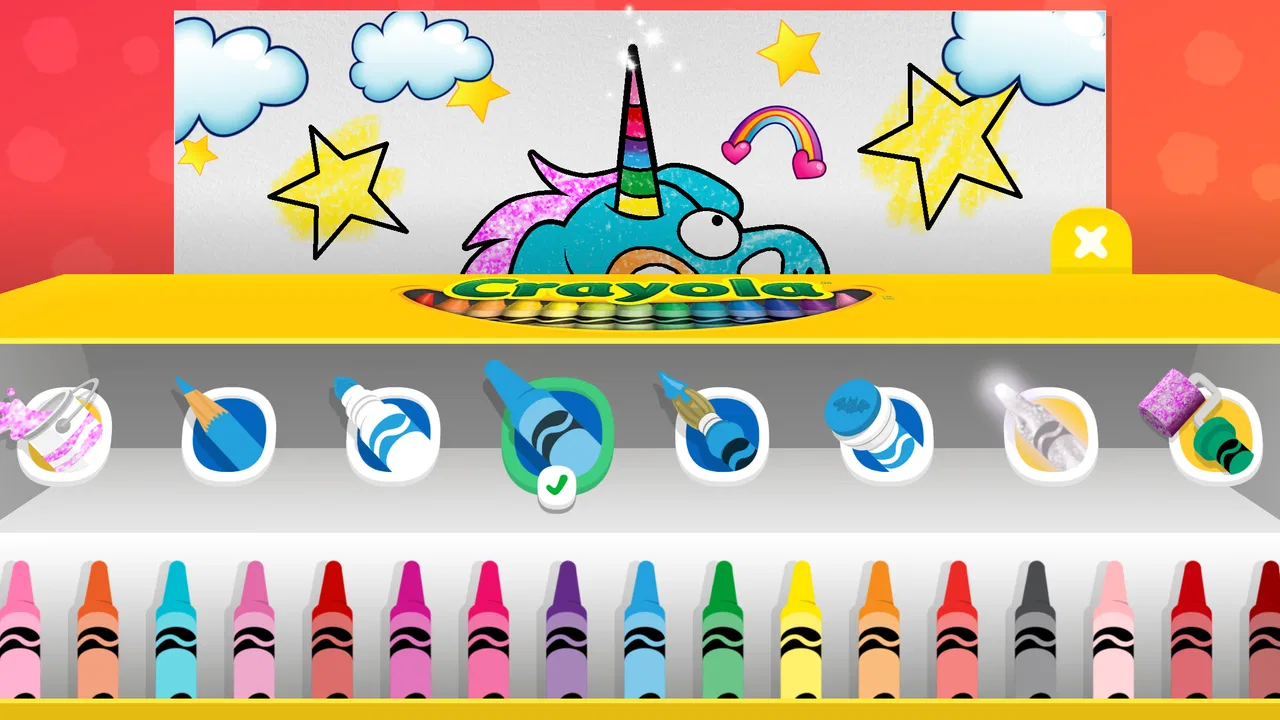
Crayola Create and Play
- 3.9
- Rating
- 1.00M
- Installs
- Free
- Price

 Analysis by App-foxy
Crayola Create and Play is the kind of children’s game I would open when I want a young child to make something rather than simply watch something. It combines coloring, drawing, art activities, learning elements, and small games in one playful space, and that mix gives it a wider purpose than a basic digital coloring book. I found it most appealing for children who enjoy switching between creative tasks, especially when they are not ready to spend a long time on one activity.
The game is made by Crayola LLC and sits in the educational category. It is free to install, rated Everyone, and has reached over a million installs. Its average rating is 4.0 from around 7,500 ratings, with roughly 2,000 written reviews. Those figures suggest a broadly positive reception, but not a flawless experience, which matches my impression: the creative side is inviting, while the amount of content and the way children move through it can take some adult guidance.
How clearly children can read and navigate the creative space
The first thing I noticed is that the experience is built around visual discovery. Children can move from coloring to drawing, learning activities, games, and other art-focused options without needing to understand complicated written instructions. That is helpful for early readers and for children who prefer to learn by trying rather than by reading a long explanation.
You May Also Like

 Blood Strike: 2.5 Anniversary
Blood Strike’s Loadouts Turn Every Drop Into a Tactical Gamble
A close look at Blood Strike’s custom loadouts: how fast access to signature weapons reshapes its battle royale rhythm, rewards preparation, and narrows the gap between fights.

 Pandora - Music & Podcasts
Pandora’s Music Is Easy to Start, but Harder to Recover
Pandora’s strength is its low-effort path from a seed to a station. Its weak spot is how much confidence it asks you to place in connection, setup, and quiet recovery.

 8 Ball Pool
 Is Built on Rivalries, Rematches, and Routine
A close look at the rivalries, rematches, shared routines, and unanswered safety questions that turn a quick pool match into a persistent mobile community.

 Samsung Music
’s Quiet Strength Is Playing What You Already Own
Its reach comes less from spectacle than from dependable access to a personal library. That simplicity is both the app’s strongest retention engine and its ceiling.

 AccuWeather: Weather Radar
AccuWeather Review: A Quick, Clear Forecast for Everyday Decisions
For everyday plans, the best forecast is the one you can understand quickly. AccuWeather makes rain timing, radar, and local conditions easy to act on, with a few trade-offs.

 Hill Climb Racing
Why Hill Climb Racing Still Turns Crashes Into One More Run
A tiny car, a bumpy hill and one more upgrade: Hill Climb Racing keeps resurfacing because its simple chaos makes every near-miss feel personal.
More From Our News Desk



At the same time, a visually rich children’s game can become busy. Crayola Create and Play presents several kinds of activity, so a child who already knows what they want can get started quickly, while a child who needs a very clear sequence may pause and look around. I would sit with a first-time player and demonstrate one complete path: choose an activity, make a change, finish it, and return to the activity area. After that, many children can explore more confidently.
For families using the game as a short independent activity, the most useful approach is to establish a simple routine. I might say, “Choose one picture to color, then try one drawing activity.” This turns an open-ended collection into a manageable session. It also reduces the chance that a child spends the whole time moving between options without actually creating anything.
The art tools are easier to understand when an adult explains their purpose once. A child may recognize a color immediately but still need help understanding how to undo a mark, change a tool, or finish an activity. That is not unusual for a creative app, but it matters when the child is expected to use it without assistance. I would not judge independence by whether a child can open the game; I would judge it by whether they can recover after an accidental tap.
Readability is also about contrast and visual focus, not only words. The bright Crayola style is naturally attractive, but children who become overwhelmed by crowded screens may do better when the adult narrows the choice. Picking one activity before handing over the device makes the session calmer and gives the child a clear goal.
There is a useful difference between this and a traditional paper coloring book. Paper gives an immediate, limited set of choices, while this game offers more room to explore and revise. That flexibility is a strength for children who dislike mistakes. On the other hand, paper is often easier for a child who needs a quiet page with no visual movement or extra menus. I see the digital version as a companion to physical art, not a complete replacement for it.
What navigation feels like in everyday use
Imagine a child waiting at a restaurant or sitting through a quiet afternoon while a parent finishes a task. I would open the game, choose an art activity, and agree on a small time limit before handing over the device. The child can focus on coloring or drawing instead of asking for a new video every few minutes. If the child starts jumping between activities, I would treat that as a sign to simplify the choice rather than assuming the game is failing.
This kind of guided start is especially useful for children with different communication styles. A child who does not easily explain what they want can point to an activity and show preferences through color, movement, or repetition. The adult can follow those signals without requiring the child to describe the interface verbally.
Parents should also expect to be part of the initial setup and orientation. The game is approachable, but “made for children” does not automatically mean that every child will understand every control immediately. A short demonstration can make the difference between purposeful play and random tapping.
Motor, sensory, and learning considerations
Drawing and coloring on a touchscreen can be satisfying for children who enjoy direct interaction. A finger becomes the drawing tool, so the child receives immediate visual feedback from each movement. That can support experimentation and hand-eye coordination in a casual way, although I would not treat the game as a formal therapy tool or as a substitute for activities recommended by a professional.
The same direct control can be difficult for children with limited fine-motor precision, tremors, reduced range of motion, or difficulty maintaining a steady touch. Small gestures may not produce the result the child expects, and a child may become frustrated if a line goes outside an intended area. In those situations, I would offer a stylus only if the child already uses one comfortably, and I would keep the focus on expression rather than accuracy.
A valuable adjustment is to change the goal. Instead of asking a child to color neatly, I might ask them to choose three favorite colors or fill an area in any way they like. This makes the activity more accessible because success depends less on precise control. It also protects the creative benefit for children who find detailed coloring tiring.
Children with sensory sensitivities may respond differently to the game’s bright presentation and changing activity choices. Some will find the colors motivating; others may prefer a slower, quieter session. I would start with one calm art task, keep the device at a comfortable brightness, and avoid treating the game as a reward that must continue after the child shows signs of overload. The app itself cannot replace an individualized sensory plan.
For children who are learning to identify colors, shapes, or creative patterns, the combination of play and art gives adults natural opportunities to talk. I might ask, “Which color did you choose?” or “What part should we draw next?” The game becomes more educational when the adult connects what is happening on screen to the child’s own ideas rather than turning every action into a quiz.
This is where it differs from a worksheet app. A worksheet usually has a correct answer and a defined progression. Crayola Create and Play is more open, so a child can practice choosing, experimenting, and making visual decisions without being marked wrong. That is excellent for confidence, but it means parents looking for systematic lessons should use a dedicated learning app alongside it.
Different abilities need different expectations
I would be careful about assuming that age alone predicts independence. Two children of the same age may have very different abilities with touch controls, visual scanning, attention, and communication. One may move through the activities alone, while another may need an adult to select the starting point or interpret what happened after an accidental touch.
The best use I found for mixed-ability play is shared creation. An adult can handle navigation while the child chooses colors or directs the drawing. Another child may prefer to control the screen while a sibling suggests ideas. This makes the game workable in a family setting without requiring every player to use it in exactly the same way.
There is also value in allowing repetition. A child who repeatedly returns to the same type of activity may be practicing control, enjoying predictability, or communicating a preference. I would not rush them toward every feature simply because the game contains several categories. Variety is available, but it should not become a demand.
When access depends on the situation
Crayola Create and Play is most convenient when a child has access to a compatible device and an adult can provide a little orientation. The current version is 2.53.0, and the game requires Android 8.0 or later. That makes checking the device an important first step before planning to use it during travel, childcare, or a classroom activity.
Because it is free to install, it is easy to try without committing money at the beginning. However, the game includes in-app purchases ranging from $0.99 to $99.99 per item. I would make the purchase settings part of the preparation, especially when a child uses the device independently. A child may understand that an activity is fun without understanding that a tap can have a financial consequence.
This purchase structure also affects how I would introduce the app to a family. I would first explore the free experience with the child, decide whether the available activities are enough, and only then consider whether additional content is worthwhile. There is no reason to make a purchase simply because a locked or promoted option appears during exploration.
For travel, the game can be useful as a planned creative break, but I would not rely on it as the only activity. A child who is sensitive to screen use may need paper, conversation, movement, or a quiet object as alternatives. The digital format is convenient, yet convenience can become a problem if it replaces every other way of passing time.
In a classroom or therapy-adjacent setting, I would use it in a small, supervised station rather than assume that a whole group will move through it at the same pace. One child may be drawing, another may be exploring a game, and another may need help identifying the next step. Its flexible nature is good for choice, but it requires an adult to manage transitions and expectations.
Families should also think about the physical setup. A child who struggles to hold a device steady may need it supported on a table. A child with visual fatigue may benefit from shorter sessions and breaks. These are simple environmental changes, but they often determine whether the app feels welcoming or demanding.
Where the experience still creates barriers
The biggest barrier is not a lack of creativity; it is the gap between open choice and clear structure. Some children thrive when they can wander among activities. Others need a predictable beginning, middle, and end. If a child becomes anxious when the next step is unclear, an adult should provide that structure instead of expecting the interface to do all the teaching.
Touch interaction can also create accidental actions. A child with limited precision may select the wrong tool or leave an unintended mark. If the child cannot easily undo or recover, frustration can arrive quickly. I recommend observing the first session closely and noting which actions cause trouble. That information is more useful than simply deciding that the game is “easy” or “hard.”
Another limitation is that a digital coloring experience cannot provide the same physical feedback as crayons, paper, paint, or clay. Children who need pressure, texture, or resistance may find the screen less satisfying. I would pair the app with hands-on materials, especially when the goal is sensory exploration rather than just visual creativity.
The educational label should also be interpreted realistically. The game can encourage creative decisions and playful learning, but it is not the same as a structured curriculum. A parent looking for explicit reading instruction, formal mathematics practice, or carefully sequenced developmental exercises should choose a specialist app instead. Crayola’s strength is the invitation to create, not academic measurement.
There is a similar trade-off for children who dislike visual stimulation. A plain drawing app may be a better fit if the child wants a blank canvas and minimal distractions. A physical coloring book may be better when the child needs a screen-free activity. Crayola Create and Play makes more sense when the child enjoys themed creative prompts and the ability to move between art and game-like activities.
Adults should resist comparing children’s results. The app can encourage a child to make something, but it should not become another place where neatness, speed, or completion is judged. For children with motor or attention differences, the most meaningful outcome may be choosing a tool, staying engaged briefly, or communicating an idea through color.
A fair, inclusive verdict for families
After looking at it through the lens of different abilities and situations, I see Crayola Create and Play as a flexible creative game with a gentle educational angle. Its strongest quality is that it gives children several ways to participate: they can color, draw, explore learning activities, or try games. That range helps families adapt the experience to a child’s mood and ability on a particular day.
The most inclusive way to use it is to adapt the expectation, not pressure the child to adapt to the interface. Let one child choose colors while an adult handles navigation. Let another repeat a familiar activity. Give a child who needs precision more time and a less exact goal. These small decisions make the experience more welcoming than simply handing over the device and expecting independent play.
I would recommend it to families who want a free starting point for digital art and who are comfortable supervising the first sessions. It is also a good option for children who lose interest in single-purpose coloring apps and enjoy moving between creative and playful activities. The Everyone rating makes it suitable for a broad family audience, while the free entry point makes testing the experience straightforward.
I would be more cautious for children who need highly predictable navigation, minimal sensory stimulation, formal academic progression, or strong physical feedback from art materials. In those cases, a simpler drawing tool, a structured educational product, or traditional paper supplies may be a better primary choice. The game can still be offered as one option, but it should not be expected to meet every need.
Crayola Create and Play has been available since November 12, 2018, and its continuing presence, current version, and large install base show that it has remained relevant to families looking for children’s creative play. My final view is positive but practical: it works best as a guided, adaptable activity rather than an automatic babysitter or a complete learning program. If you prepare the device, control purchase access, choose a manageable starting activity, and respect each child’s way of participating, it can become a genuinely enjoyable space for making and experimenting.
FAQs for Crayola Create and Play
01What is Crayola Create and Play?
Crayola Create and Play is an interactive app designed to inspire creativity in children. It offers a variety of activities such as drawing, coloring, and crafting, all within a safe digital environment. The app includes educational games that help develop skills in math, spelling, and problem-solving, making it both fun and educational.
02Is Crayola Create and Play suitable for all age groups?
Crayola Create and Play is primarily designed for children aged 3 to 8 years old. The app’s interface and activities are tailored to be engaging and easy to navigate for young users. However, older children and even adults may find enjoyment in the artistic tools and creative challenges it offers.
03Does Crayola Create and Play require an internet connection?
While some features and updates in Crayola Create and Play may require an internet connection, the app can be used offline for most of its core activities. This allows children to engage with the creative tools and games without needing a constant internet connection, making it ideal for travel or areas with limited connectivity.
04Are there any in-app purchases in Crayola Create and Play?
Crayola Create and Play offers some content for free, but it also includes optional in-app purchases. These purchases can unlock additional features, activities, and content packs. Parents can set restrictions on in-app purchases to ensure children do not buy items without permission, maintaining control over spending.
05How can parents ensure their child's safety while using Crayola Create and Play?
Crayola Create and Play is designed with child safety in mind, featuring a secure environment without ads and external links. Parents can monitor usage and set time limits within the app’s parental controls. These features help maintain a safe digital space for children to explore their creativity.
Pros
- Engaging activities for creative expression.
- Kid-friendly interface with easy navigation.
- Regular updates with new content and features.
- Supports offline play for uninterrupted fun.
- Parental controls ensure safe usage.
Cons
- Limited free content; requires in-app purchases.
- May not challenge older kids as much.
- Occasional bugs can disrupt gameplay.
- Requires large storage space on device.
- Subscription model might not suit everyone.

Crayola Create and Play
Gallery